
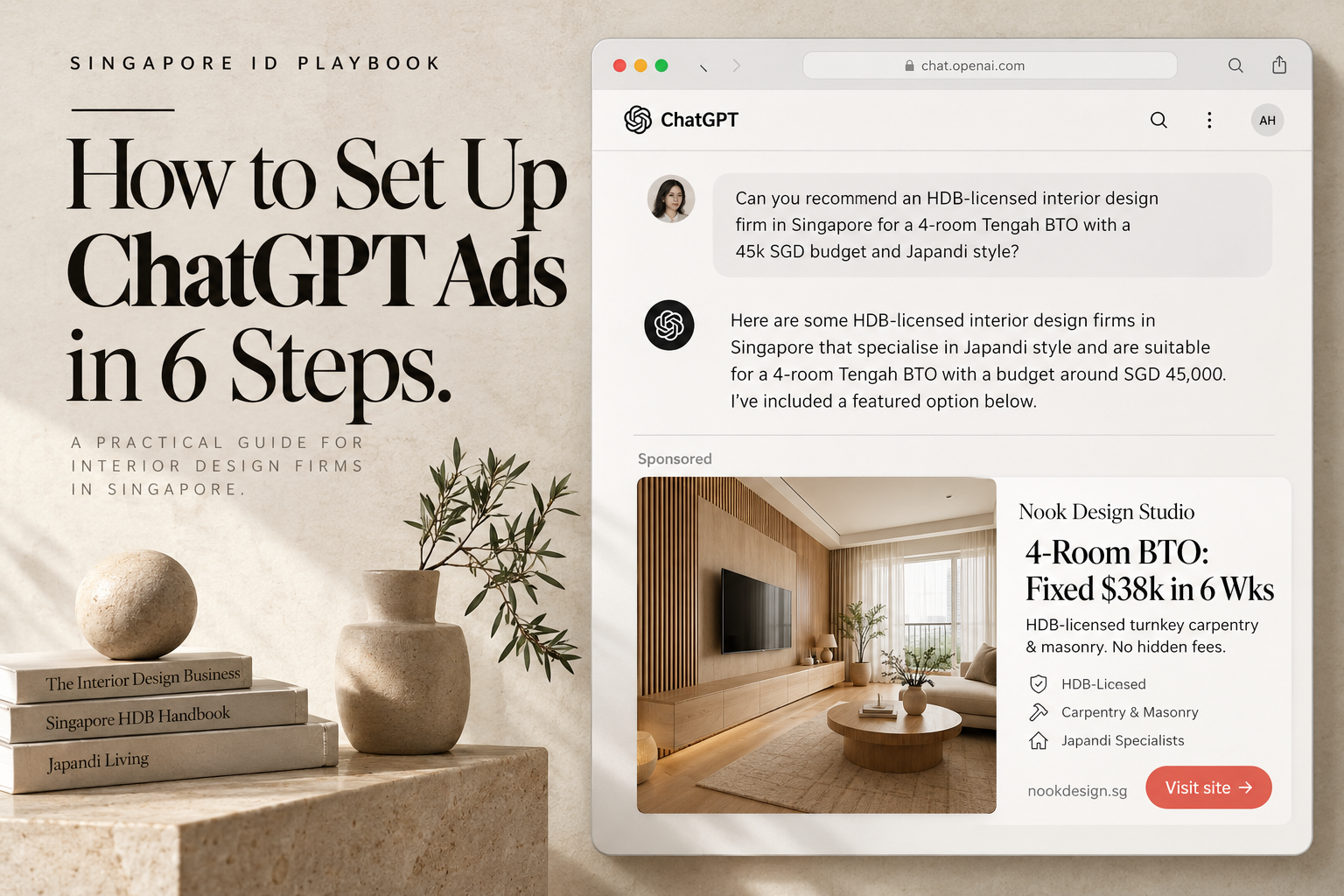
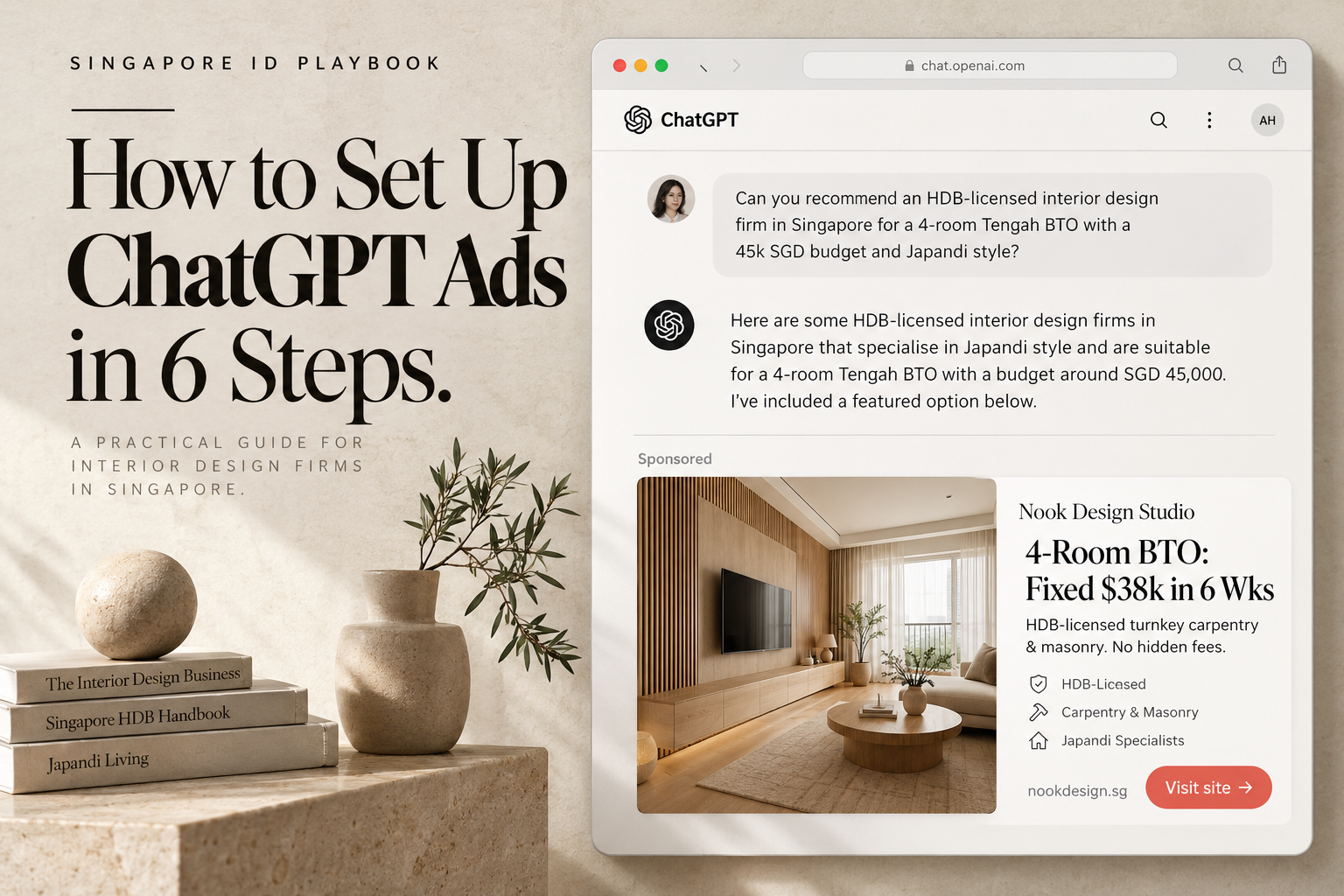
- This ChatGpt Ads playbook for: Singapore Interior Design Firm Owners, Managing Partners, Creative Directors, and In-House Growth Marketers
- Published By: 24owlsgroup Pte Ltd (Singapore Digital Marketing & GEO Strategy Agency)
Table of Contents
- The Industry Dilemma: Why Singapore ID Firms Are Trapped by Google Ads & Aggregator Portals
- Technical Prerequisites: The Singapore ID Verification Stack
- Step 1: Create Your Advertiser Account & Business Verification
- Step 2: Set Up Campaign Objectives, SGD Budget & Location
- Step 3: Write Context Hints (Conversational Targeting)
- Step 4: Craft the Ad Creative & Outcome-First Copy
- Step 5: Install OpenAI Pixel, Conversions API & Floor Plan Tracking
- Step 6: Launch Review & Status Troubleshooting (Serving vs Not Serving)
- Series Navigation: The 24owlsgroup ChatGPT Advertising Playbook
- Is Your Interior Design Firm Ready for ChatGPT Ads? Free Setup Audit
- Frequently Asked Questions (FAQ)
The Industry Dilemma: Why Singapore ID Firms Are Trapped by Google Ads & Aggregator Portals
Freshness Badge: Last verified: October 2026 | Technical Field Manual: OpenAI Ads Manager Commercial Interface
Your competitors are still paying 18 SGD a click on Google Search just to fight over five-way shared leads on renovation portals.
Wild concept, apparently.
Here is the reality of running an interior design studio in Singapore right now:
- The Google Ads Cost Spiral: Bidding on
"interior design singapore"or"bto renovation packages"routinely costs between 14 and 22 SGD per click. Half of those clicks bounce in three seconds because your homepage took too long to load. - The Portal Trap: Aggregators sell the exact same homeowner enquiry to five competing studios at once. You end up in a race to the bottom, quoting against firms willing to cut corners just to survive.
- The Silent Shift to ChatGPT: Homeowners collecting keys for Tengah BTOs or River Valley condos aren't browsing link directories anymore. They paste their floor plans into ChatGPT and ask: "Compare turnkey design-and-build firms against direct sub-contractors for a 93sqm resale flat on a 50k SGD budget."
[The Portal Trap]     Homeowner fills form -> Lead sold to 5 firms -> Price war begins
[Conversational Ads]  Homeowner discusses floor plan in ChatGPT -> Your ad appears exclusively beneath the answer
If your ad looks like an ad, it gets scrolled. If your landing page takes four seconds to decode, they bounce. Full stop.
Here is how to set up OpenAI Ads Manager (ads.openai.com) without the corporate fluff.
Technical Prerequisites: The Singapore ID Verification Stack
Gather these details before opening the dashboard. Hunting for registration numbers mid-setup is an unforced error:
- Company Domain Email: Use
director@yourfirm.sg. Signing in with a personal Gmail triggers warnings and looks amateur. - ACRA Entity Details: Your registered Singapore company name and active Unique Entity Number (UEN).
- Accreditation Badges: Your Housing & Development Board Directory of Renovation Contractors (HDB DRC License) and CaseTrust-RCMA registration. Have the numbers ready for your landing page.
- Corporate Payment Card: A Singapore-issued credit card billed in SGD. OpenAI places an authorisation hold of approximately $50 USD to verify the line.
- Server Crawler Permissions: Verify your hosting firewall allows
OAI-AdsBot. If your server throws a 403 error, your ads die before they launch:
User-agent: OAI-SearchBot
Allow: /

User-agent: OAI-AdsBot
Allow: /
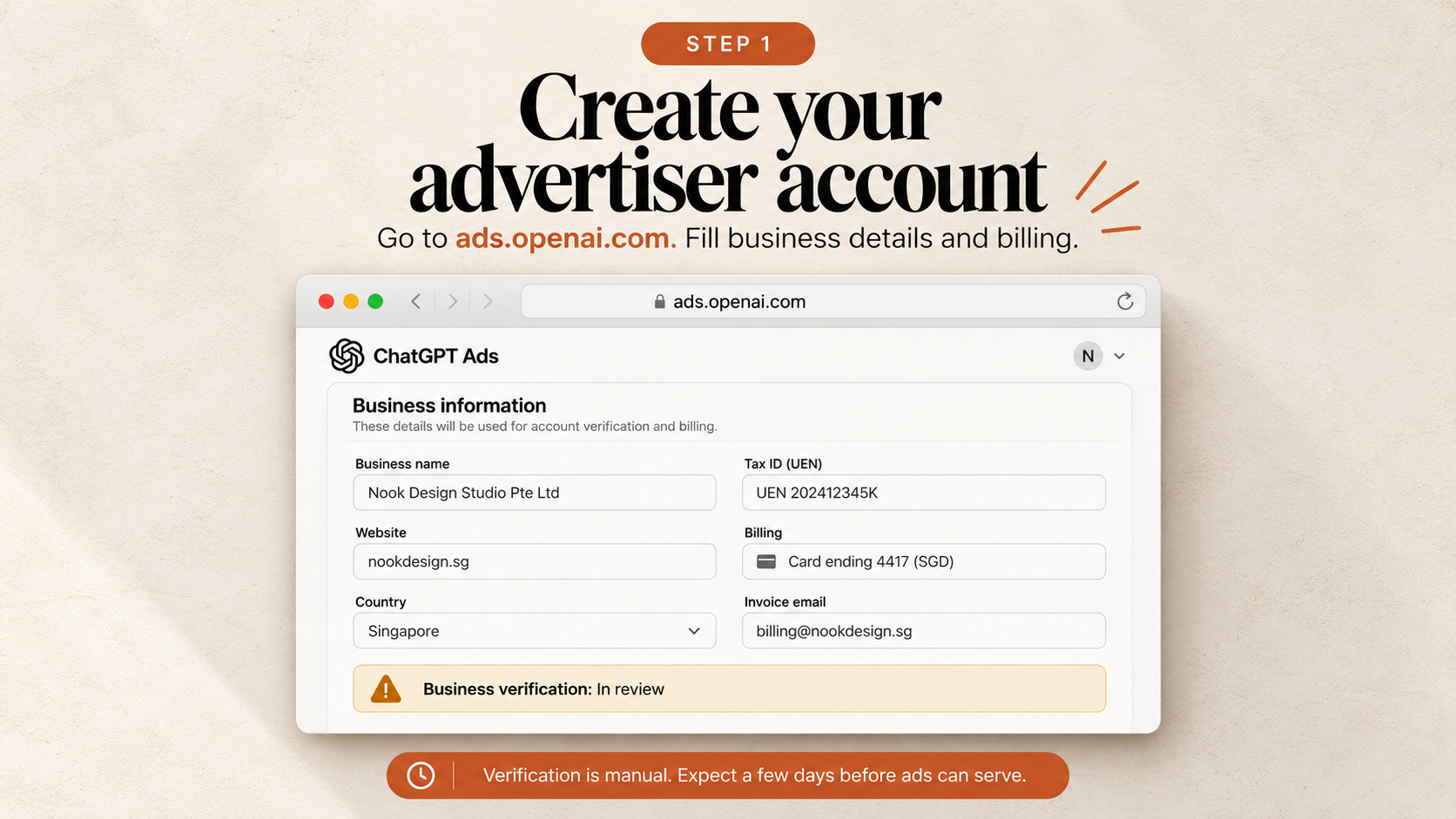
Step 1: Create Your Advertiser Account & Business Verification
Open ads.openai.com and log in with your verified OpenAI organisation account.
[Advertiser Account Setup]
Business Name:  Nook Design Studio Pte Ltd
Website:        [https://nookdesign.sg](https://nookdesign.sg)
Country:        Singapore
Currency:       SGD (Singapore Dollar) — Locked permanently
Tax ID:         UEN 202412345K
Status:         Business Verification: In Review
Keep it simple:
- Enter Your Registered Entity Name: Use the exact name registered with ACRA. If your trading brand is different, keep it consistent across your domain.
- Select Singapore & Currency SGD: Pay attention here. The currency selection is permanent. If you accidentally select USD, enjoy explaining foreign transaction fees to your accountant.
- Submit Your ACRA UEN: Enter your UEN in the tax ID field to ensure tax-compliant invoicing.
Manual business verification takes between one and five working days. You can build your campaign and install tracking while compliance does its job.
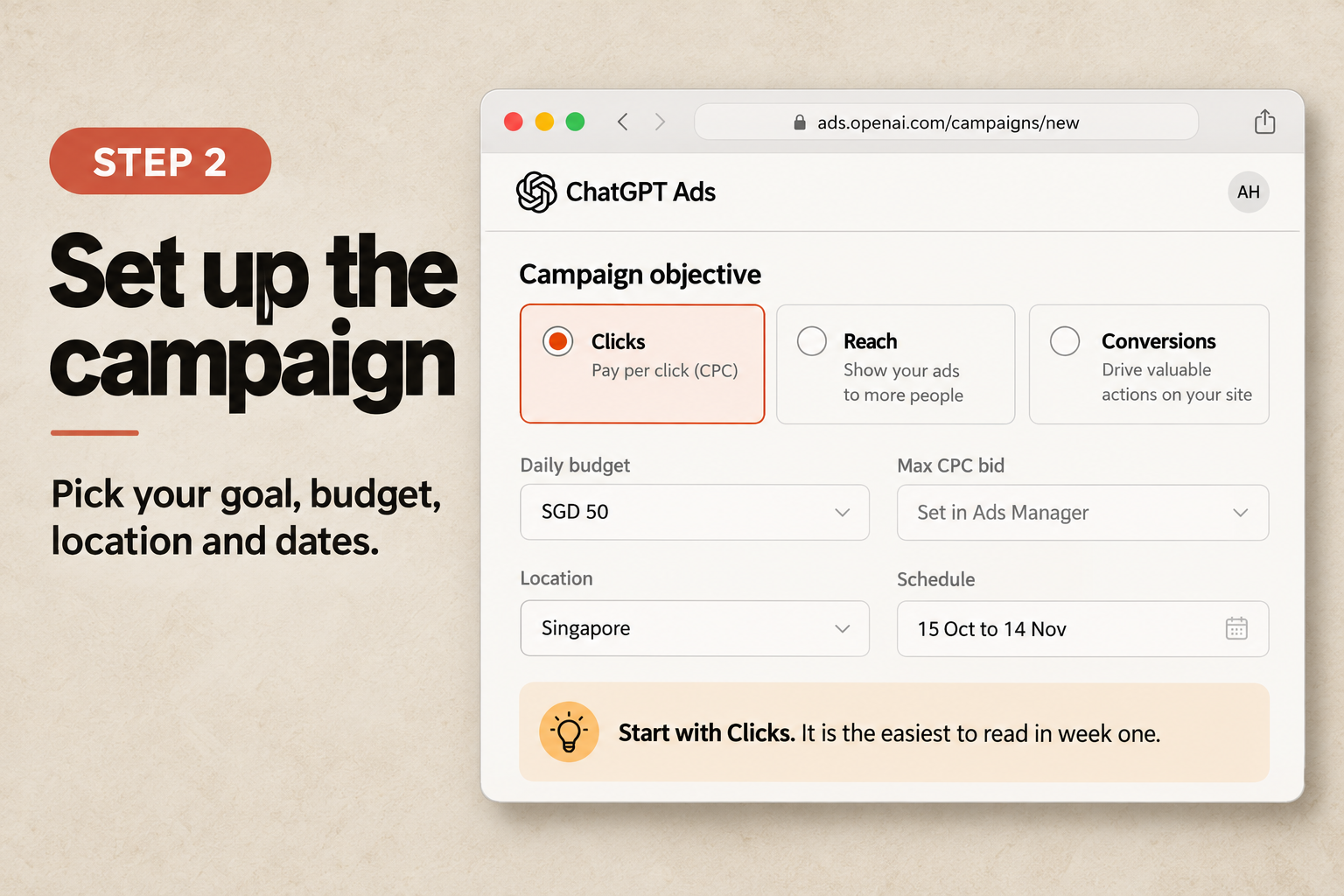
Step 2: Set Up Campaign Objectives, SGD Budget & Location
Click Create Campaign in Ads Manager and choose Standard.
1. The Objective
Pick Clicks (CPC) for your first run.
Everyone wants consultation leads on day one. But the algorithm needs click volume to understand which conversation scenarios trigger engagement before it can optimize for form fills. Walk before you sprint.
2. Daily Budget & Pacing
- The Platform Floor: Ads Manager will not let you enter anything below SGD 25.00 per day.
- The Singapore Reality: At an average conversational CPC of SGD 5.50, a 25-dollar daily budget buys four or five clicks. That is not a campaign; that is a slow burn to nowhere.
- The Recommended Test: Run SGD 50.00 to SGD 80.00 per day for 14 consecutive days.
- The 7-Day Budget Week: Spend floats day to day based on search traffic. A high-volume Wednesday might consume SGD 90, but total spend will never exceed seven times your daily budget across the week (SGD 350/week on a SGD 50/day setup).
3. Location Targeting
Set location to Singapore. Unless your studio exclusively renovates prime bungalows in Districts 9 and 10, country-wide targeting delivers the lowest cost per impression.
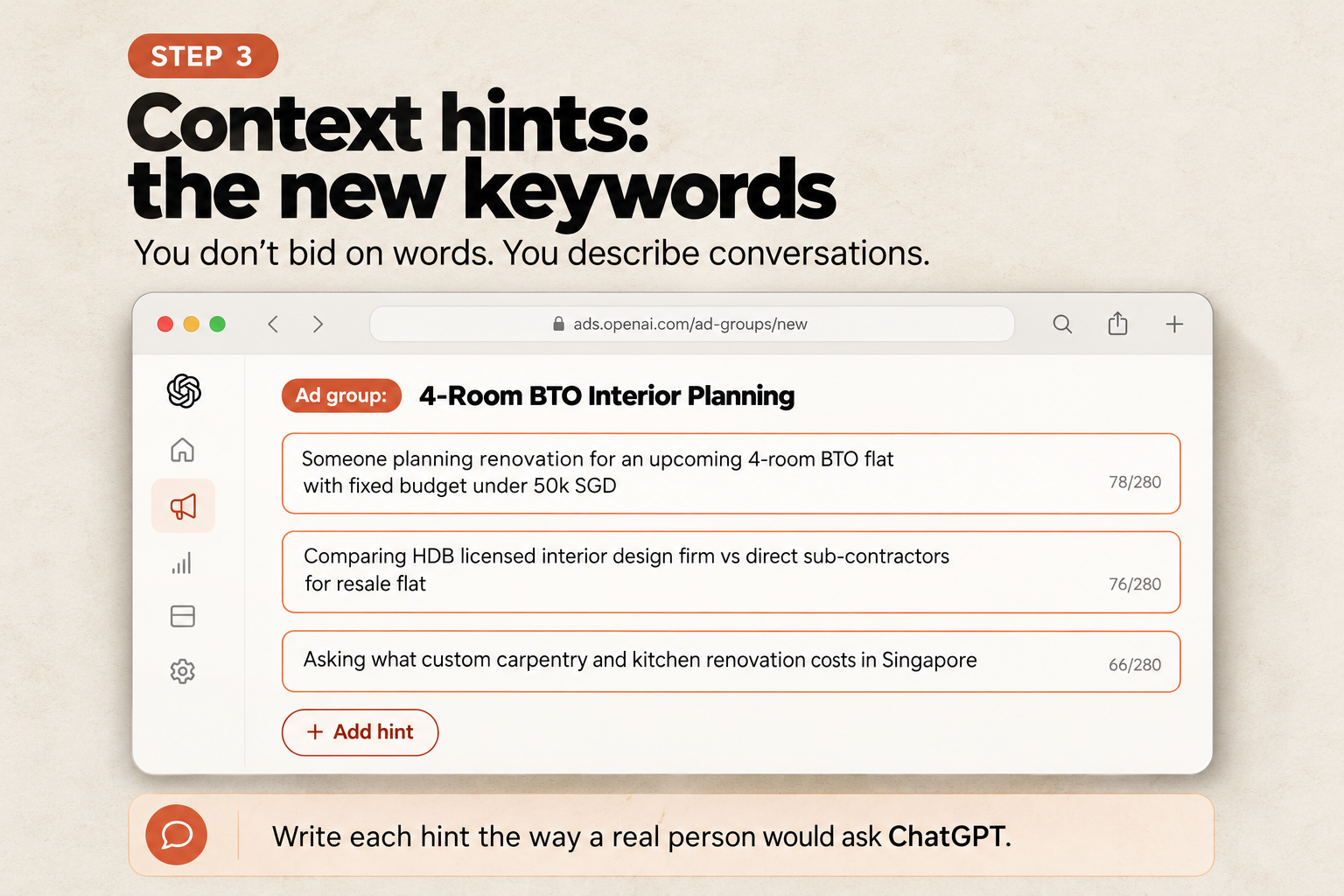
Step 3: Write Context Hints (Conversational Targeting)
Throw out your keyword lists. Keywords do not exist here.
In OpenAI Ads Manager, you write Context Hints. You are describing real human dilemmas, not static search strings.
[The Singapore ID Context Hints Architecture]
       │
       ├─► Ad Group 1: BTO Value & Budget Certainty
       │   Hint 1: "First-time Singapore homeowner planning interior renovation for an upcoming 4-room BTO flat with budget under SGD 50,000"
       │   Hint 2: "Comparing HDB licensed interior design firms vs direct sub-contractors for BTO carpentry"
       │
       ├─► Ad Group 2: Private Condominium Spatial Optimization
       │   Hint 1: "Singapore private condo owner seeking Japandi or minimalist space-saving carpentry for 2-bedroom compact apartment"
       │   Hint 2: "Looking for reputable interior designer experienced in 650 to 900 sqft resale condo layout reconfiguration"
       │
       └─► Ad Group 3: Resale Hacking & Regulatory Safety
           Hint 1: "Homeowner researching structural wall hacking permits and SCDF compliance for 5-room resale flat in Singapore"
           Hint 2: "Comparing CaseTrust accredited renovation contractors with transparent fee schedules and deposit escrow protection"
The Unfiltered Truth: Cut Out the Noise
Here is where amateur advertisers bleed capital: failing to set boundaries.
Unlike Google Ads, where you drop a list of negative keywords, OpenAI Ads Manager requires explicit conversational exclusions (Messages to Avoid). If you skip this, you will pay 5 SGD a click to speak with people who have zero intention of hiring you:
- Cut Out Academic Research: Block queries about NAFA, Lasalle, or Temasek Poly interior design assignments and drafting software tutorials.
- Cut Out Job Seekers: Block searches for junior designer salaries, 3D visualizer vacancies, and commission splits.
- Cut Out DIY Fixes: Block questions about DIY wall patching, paint prices at hardware stores, and landlord deposit disputes.
Step 4: Craft the Ad Creative & Outcome-First Copy
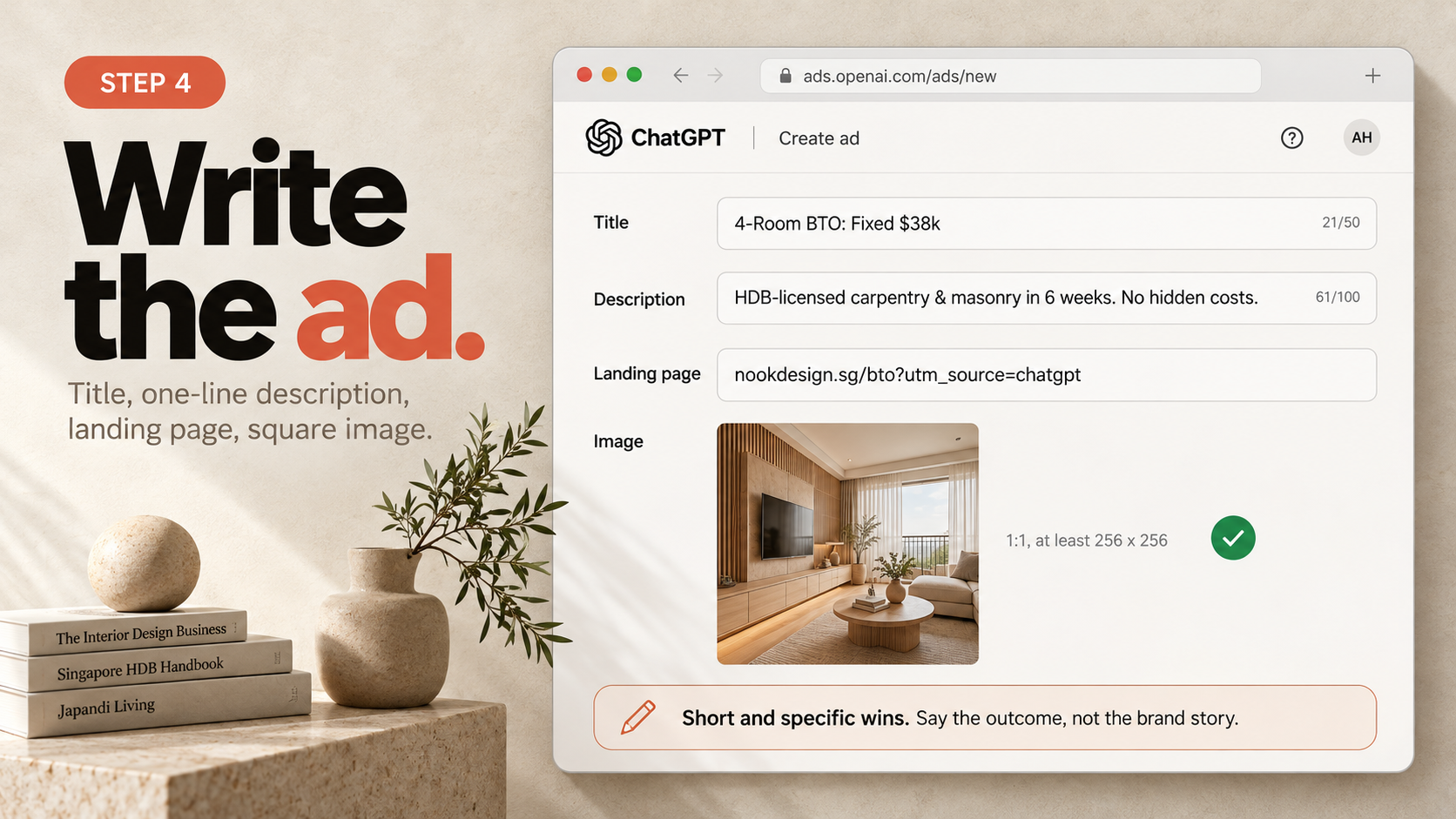
Your ad card has roughly two seconds to earn a click.
"Award-winning bespoke luxury interiors" will not cut it. Singapore homeowners have read that exact sentence on thirty different vans in Ubi. It means nothing.
Lead with the outcome:
- Title (Headline): 16 to 24 characters recommended (hard limit 50).
- Description: 32 to 48 characters recommended (hard limit 100). Put the core hook in the first 50 characters before mobile truncation cuts it off.
- Visual Asset: 1:1 square image (minimum 256x256 pixels). Use real photography of completed Singapore homes. No 3D renders. No corporate logos. Real woodwork, real lighting.
- Destination URL: A dedicated landing page matching the prompt context.
| Focus Typology | High-Converting Headline (16–24 Chars) | Supporting Body Copy (32–48 Chars) | Visual Direction |
|---|---|---|---|
| BTO Renovation | 4-Room BTO: Fixed $38k | Turnkey carpentry & masonry in 6 weeks. No hidden costs. | Clean Japandi BTO living room & custom console |
| Condo Space-Saving | Condo Japandi Design | Custom storage solutions for 650–900sqft private apartments. | Built-in hidden dining nook in a 2-bedroom condo |
| Accredited Trust | HDB & CaseTrust ID | 100% deposit protection with licensed HDB contractors. | Handover photograph with CaseTrust trust badge |
Step 5: Install OpenAI Pixel, Conversions API & Floor Plan Tracking
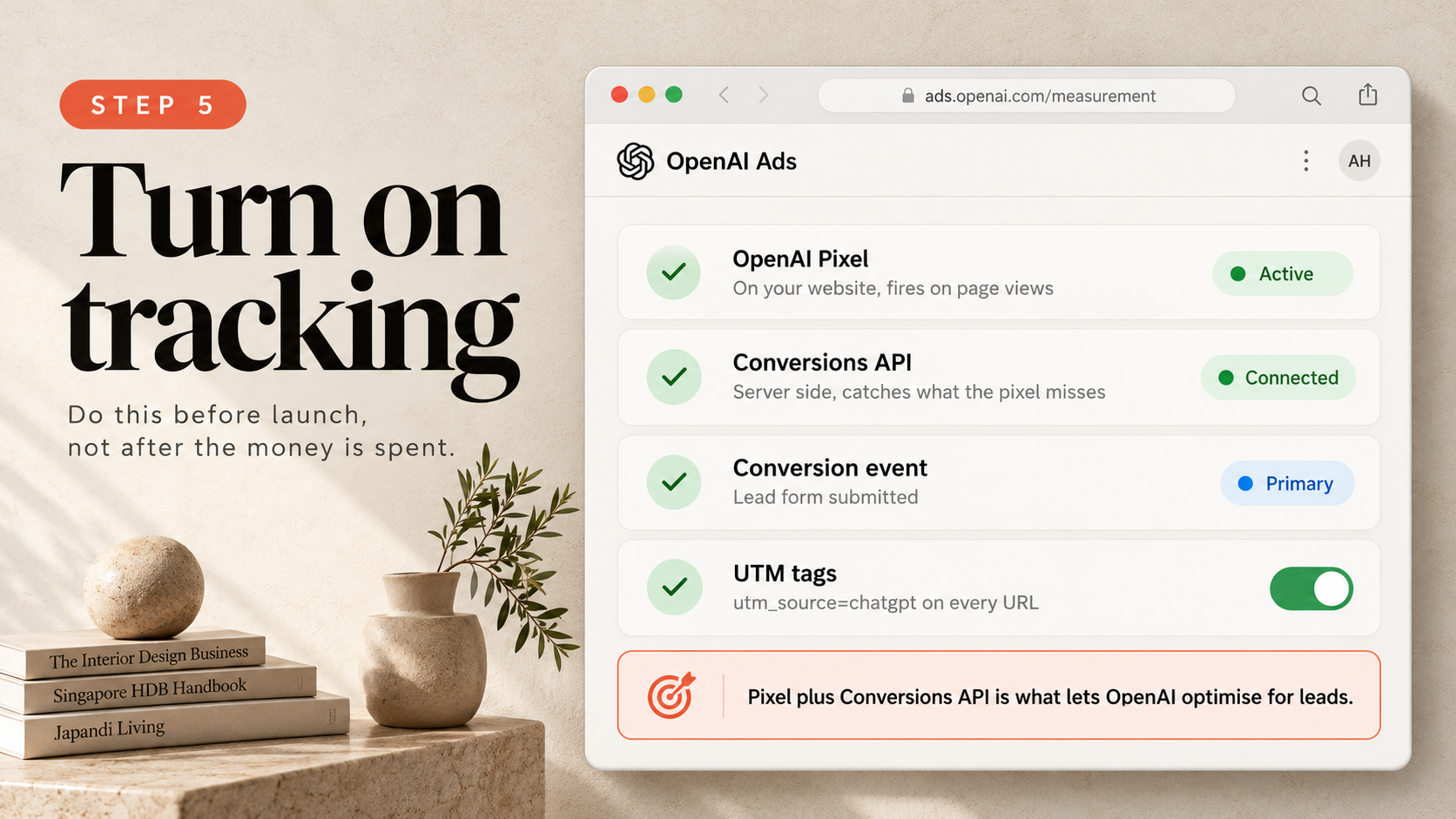
Sending traffic to a website without tracking conversions is just lighting money on fire for aesthetic reasons.
Navigate to Measurement in Ads Manager.
1. Website Pixel Placement
Add the tracking script to your website <head> across all pages:
<!-- OpenAI Ads Pixel -->
<script>
!function(e,t,n,s,a,c,p){e.oaiq||(a=e.oaiq=function(){a.process?a.process.apply(a,arguments):a.queue.push(arguments)},a.queue=[],c=t.createElement(n),c.async=!0,c.src="[https://ads.openai.com/pixel.js](https://ads.openai.com/pixel.js)",p=t.getElementsByTagName(n)[0],p.parentNode.insertBefore(c,p))}(window,document,"script");
oaiq("init", "PIXEL-SG-ID-XXXXX");
oaiq("measure", "page_viewed");
</script>
2. High-Value Conversion Events
Don't track page views as conversions. A page view is not a client.
Fire the conversion event when someone actually submits an enquiry or uploads a floor plan:
// Fire on consultation booking or floor plan upload
oaiq("measure", "lead_created", {
  type: "bto_consultation_booking",
  property_type: "hdb_4_room",
  currency: "SGD",
  estimated_renovation_value: 45000
});
3. Server-Side Conversions API (CAPI)
Singapore homeowners love browsing on mobile devices with strict tracking prevention enabled. Connect the Conversions API. Server-to-server tracking ensures consultation data reaches your dashboard even when client-side pixels get blocked.
Step 6: Launch Review & Status Troubleshooting (Serving vs Not Serving)
Click Launch Campaign.
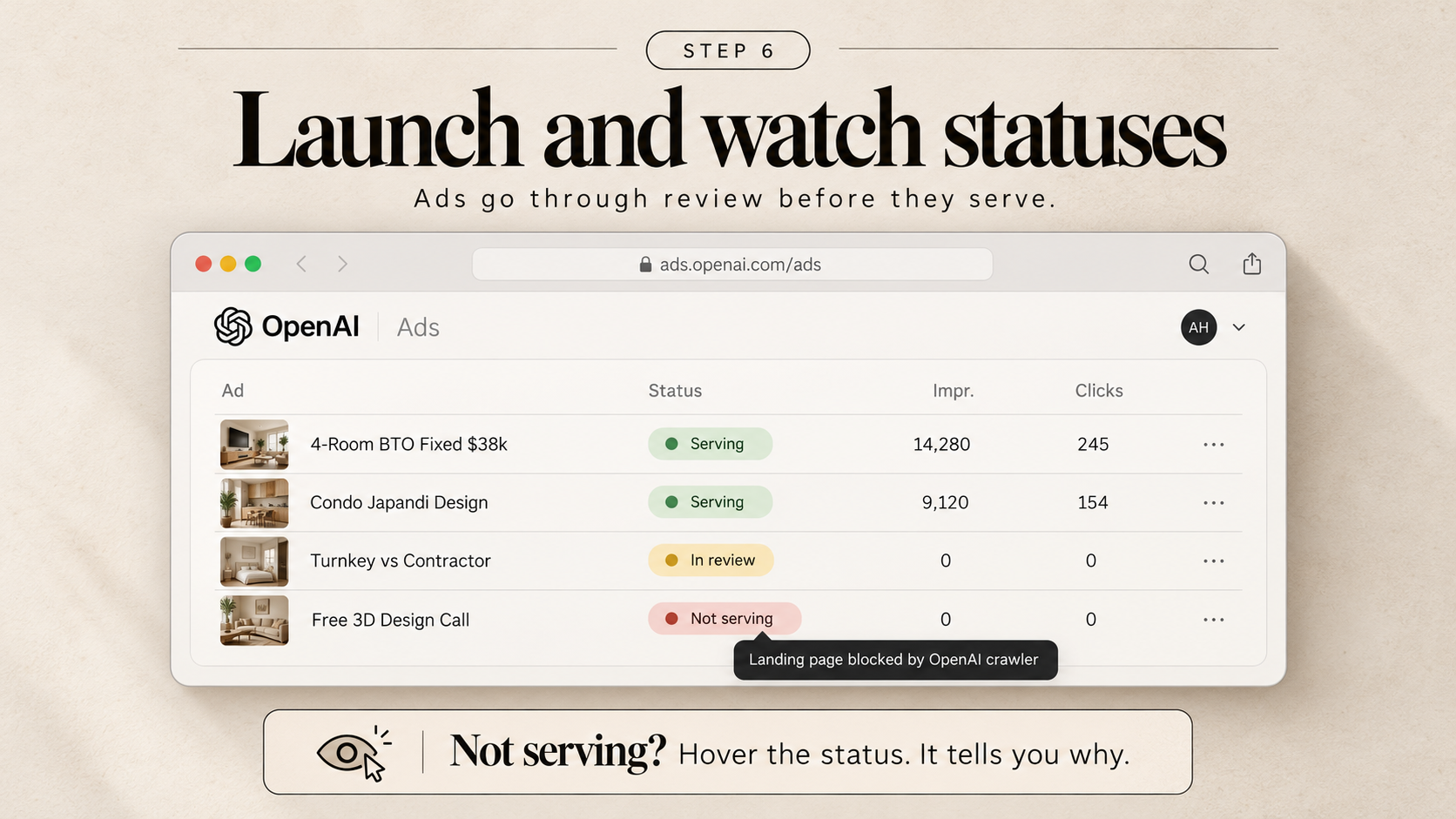
Your campaign enters compliance review. It typically takes 24 to 48 hours.
When review completes, Ads Manager displays one of three status badges:
- Serving (Green): You are live and winning auctions.
- In Review (Amber): Standard creative and landing page verification. Be patient.
- Not Serving (Red): Delivery has stalled.
[Diagnostic Checklist: What Broke?]
1. "Landing page blocked by OpenAI crawler"
   -> Your hosting firewall blocked OAI-AdsBot with a 403 error. Whitelist it in Cloudflare or robots.txt.
2. "Context hint too narrow"
   -> You targeted a single block in Punggol. Broaden your hint to "Singapore 4-room BTO homeowners".
3. "Missing required business verification"
   -> Upload your ACRA BizFile snapshot in organisation settings.
If it says Not Serving, hover over the badge. It tells you the exact diagnostic. Fix the root cause instead of deleting the ad group.
Series Navigation: The 24owlsgroup ChatGPT Advertising Playbook
This tactical breakdown forms Part 2 of our Singapore conversational advertising trilogy:
- Part 1 (The Macro Strategy): Ads on ChatGPT: The Complete Singapore Business Guide to Open AI Ads (2026) — The economics, the 25 SGD floor, and conversational intent vs search keywords.
- Part 2 (Current Setup): ChatGPT Ads Manager for Singapore Interior Designers: The 6-Step Setup Playbook — Dashboard execution, pixel architecture, and HDB compliance.
- Part 3 (Targeting & Psychology): Running Ads on ChatGPT for Singapore Interior Designers (2026) — Deep-dive Context Hints formulation, negative boundaries, and landing page conversion psychology.
For studios pairing paid acquisition with organic search presence, review our field manuals on how to track AI citations and Generative Engine Optimisation (GEO).
Is Your Interior Design Firm Ready for ChatGPT Ads? Free Setup Audit
Your business has enough side quests. Navigating conversational ad auctions doesn't need to be one of them.
If you are tired of paying 18 dollars a click on Google Search and competing against five firms for the same portal lead, pass it over.
24owlsgroup audits your conversational demand, locks down your negative boundaries, and gets your studio serving before your competitors even know the platform exists.
Talk to the performance team:
- Website: twentyfourowls.com
- Location: Singapore
- Schedule an Audit: Connect with our Singapore performance team to review your OpenAI Ads Manager configuration.
Frequently Asked Questions (FAQ)
Why should Singapore interior design firms use ChatGPT Ads instead of Google Search Ads?
Google Search in Singapore is saturated, with renovation head terms costing between 14 and 22 SGD per click. ChatGPT Ads captures homeowners during active problem-solving at an average CPC of 3.50 to 5.50 SGD, delivering pre-qualified prospects without portal competition.
What regulatory accreditations should Singapore ID firms display on ad landing pages?
To overcome consumer skepticism regarding contractor abandonment, your landing page must display your ACRA Unique Entity Number (UEN), your active HDB Directory of Renovation Contractors (DRC) license number, and your CaseTrust-RCMA accreditation badge above the fold.
How much should a Singapore ID firm allocate for a pilot ChatGPT Ads campaign?
While the technical platform minimum is 25.00 SGD per day, run 50.00 to 80.00 SGD per day over 14 consecutive days. This provides sufficient statistical click volume (350 to 500 targeted visits) to generate qualified consultation bookings.
How do I stop my ads from triggering on students or job applicants?
Define explicit "Messages to Avoid" within your Context Hints. Instruct the system to cut out prompts related to interior design diploma courses, drafting tutorials, junior designer salary inquiries, and DIY painting guides.
This guide is part of the AI Chatbot Hub, which collects our Singapore AI chatbot guides in one place.